


Arkansas Weather Network
4.351.00 Reviews
App Specs
- Version
- 6.7.1.7
- Updated On
- License
- Free
- Downloads
- 10,000+
- Developer
- Arkansas Weather Network LLC
- Categories
- Weather
- Platform
- Android
Screenshots
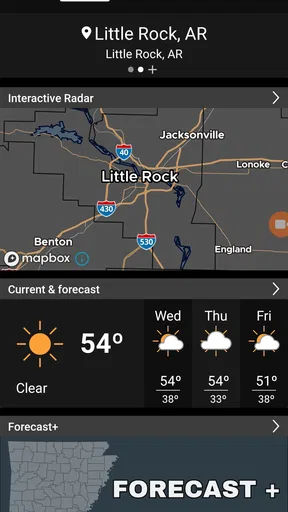
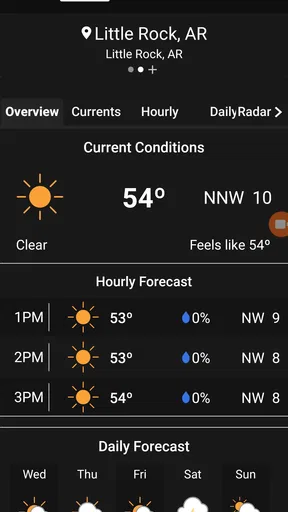
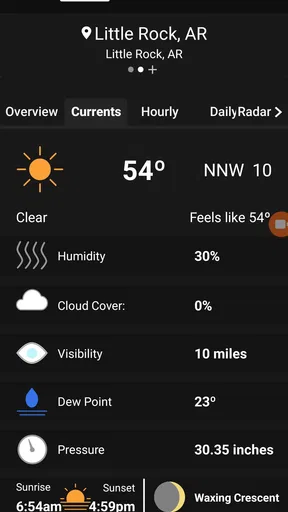
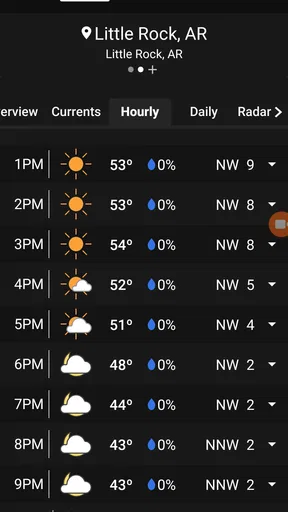
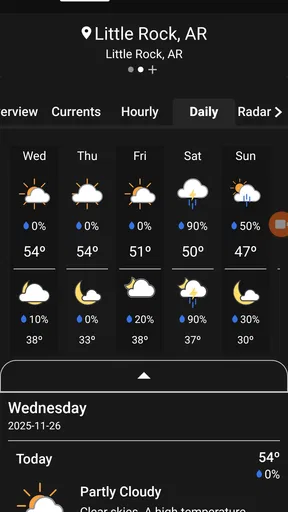
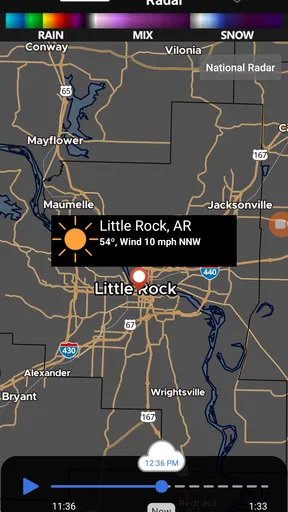
 Analysis by AppCompare
I found Arkansas Weather Network most useful when I stopped treating it like a generic forecast app and started using it as a local weather companion. Its focus is narrow by design: Arkansas weather, presented through the work of Arkansas Weather Network LLC. That specialization gives the app a clearer purpose than broad services that try to cover every place on earth. If you live in the state, travel across it, or regularly need to understand changing conditions from one Arkansas community to another, this free weather app deserves a closer look.
My overall view is positive, with one important qualification: this is best for people who value local relevance over a huge collection of extras. The app is not trying to be a universal weather dashboard, a travel planner, or a replacement for every emergency information source. Its appeal comes from keeping attention on real-time Arkansas coverage and making that information easier to consult during ordinary decisions, from leaving for work to deciding whether a weekend drive is sensible.
The Android release is available to users on Android 7.0 or later, and the current version is 6.7.1.7. It is free, rated for Everyone, and has passed the ten-thousand-install mark. Those details make it approachable for households with older compatible phones as well as newer devices. I also noticed that its average rating sits at 4.3 from more than a hundred ratings, while the review count is above fifty, which suggests a modest but genuinely engaged user base rather than a giant, anonymous audience.
Why local Arkansas coverage changes the experience
The strongest reason to use Arkansas Weather Network is the way a statewide focus can make weather information feel more practical. A national app may tell me that rain is likely in Arkansas, but that broad statement is not enough when I am deciding whether to drive from one part of the state to another. Conditions can change across short distances, and a forecast that feels useful in one community may be less helpful elsewhere.
That is where the app's identity matters. The store summary emphasizes real Arkansas weather, real people, and real-time coverage statewide, and I think the important part is the combination rather than any single phrase. A local weather service has a reason to present conditions in a way that makes sense to residents. Instead of forcing the user to dig through a worldwide map or a crowded feed, the app keeps the state itself at the center of the experience.
I would use it first thing in the morning when planning a commute, especially on a day when the forecast looks unsettled. I would check again before heading home, not because an app can remove uncertainty, but because weather decisions are often about timing. A short delay, a different route, or a change of plans can matter more than a polished long-range forecast.
Another practical use is preparing for a trip within Arkansas. Someone driving between cities, visiting family, or working across several counties does not necessarily need international weather layers. They need a quick way to stay oriented to conditions across the state. That statewide perspective is more useful than a single saved home location when the day involves movement.
Worth Reading Before You Choose

EA SPORTS FC Mobile 26 Is a Bigger Football Game, but It Takes Time

Flipboard Shows What News Apps Must Do Beyond the Feed

Switching to Android Auto Means Rethinking Your Driving Routine

Google Calendar Makes a Crowded Week Easier to Manage

Ludo King Makes the Most of the Minutes Between Plans

Baby Panda World Brings Quick Play to Modern Phones, but Its Game Library Feels Busy
A better routine than checking only one forecast
I recommend using the app as part of a simple two-stage routine. First, check it when you are making a plan. Then check again shortly before the plan begins. This reduces the temptation to treat an earlier forecast as a promise. Weather information is most valuable when it supports a decision at the right moment, not when it is read once and forgotten.
For example, if I were planning an outdoor appointment, I would not look only at the morning forecast and assume the afternoon would behave the same way. I would use the app to establish a general expectation, then revisit it before leaving. That habit is particularly sensible for Arkansas days when conditions may shift while a person is at work or traveling.
A less obvious benefit of a focused app is reduced distraction. Large weather platforms often place maps, lifestyle cards, advertisements, video, health information, and unrelated recommendations beside the forecast. Some users enjoy that variety, but I usually want to answer one question quickly: what should I expect where I am going? Arkansas Weather Network has a more defined job, and that can make a short check feel less like browsing.
What the developer’s focus suggests for daily users
Arkansas Weather Network LLC is not presented as a broad international weather brand. The developer name and the product’s state-specific identity point toward a service built around regional attention. I find that reassuring for users who care about local context, although it also sets a clear boundary. The app makes the most sense when Arkansas is the place that matters.
That boundary is useful to recognize before installing it. If I were planning a trip through several states, I would probably pair it with another source that handles the wider journey. If my daily life is centered in Arkansas, however, the focused coverage is an advantage rather than a restriction. The right question is not whether it replaces every weather tool, but whether it gives Arkansas conditions the attention I actually need.
Where the app earns its place
The app’s biggest strength is clarity of purpose. Its category is weather, but its real distinction is geographic specialization. I do not have to pretend that a worldwide service and a statewide service solve exactly the same problem. For an Arkansas resident, local concentration may be more valuable than an enormous feature list.
I also like the low barrier to trying it. There is no purchase price, the age rating is Everyone, and the Android requirement reaches back to version 7.0. That combination makes it reasonable to install on a personal phone, a family member’s device, or an older backup handset without turning the decision into a major commitment.
The app’s audience size is also worth interpreting carefully. More than ten thousand installs is enough to show that it has reached real users, while the 4.3 average from over one hundred ratings gives a useful sign of general satisfaction. I would not treat those figures as proof that every person will love the experience. I would read them as evidence that the app has a visible group of people who find its approach worthwhile.
One of the more useful trade-offs is that local focus can improve decision-making even when it does not provide more information in every category. A user who wants a quick Arkansas check may benefit from relevance and familiarity more than from extra layers. In other words, the app’s strength is not necessarily having the most buttons; it is helping the user keep the important geographic question in view.
How I would use it during a changing-weather day
Imagine a weekday when I need to leave home early, work in another Arkansas community, and return after sunset. I would check the app before leaving to understand the broad shape of the day, then check again before the return trip. If conditions looked uncertain, I would build extra time into the journey rather than relying on a forecast as a guarantee.
For a family, the same routine could guide decisions about school activities, errands, or outdoor plans. The useful insight is that the app does not need to make the decision for me. It needs to give me a local reference point that I can consult quickly and repeatedly. That is a more realistic role for a weather app than pretending it can eliminate risk.
I would also use it before committing to plans that are difficult to change. A casual walk can be postponed; a long drive, outdoor work shift, or visit to relatives may require more preparation. Checking a locally focused source before those commitments is a small habit, but it can prevent the common mistake of relying on a generic forecast remembered from several hours earlier.
Where it may be less satisfying
The same specialization that makes the app appealing can make it a poor fit for some users. If I wanted a single app for a multi-state road trip, international travel, or several homes in different countries, I would choose a broader alternative. A statewide service is naturally less convenient when my attention is constantly moving beyond Arkansas.
I would also skip it if my main interest were extensive weather analysis rather than practical day-to-day checking. Some people want deep historical charts, elaborate customization, detailed planning tools, or a large collection of atmospheric layers. The information available here should be judged by how well it serves Arkansas weather awareness, not by whether it imitates every specialized meteorology tool.
There is another limitation that is easy to overlook: local relevance does not automatically mean perfect precision for every street or moment. Weather is variable, and statewide coverage still requires the user to think about location and timing. I would not use any forecast app as the sole basis for a serious safety decision. When conditions are dangerous, official emergency guidance should take priority, and the app should be treated as one part of a responsible information routine.
That is not a criticism unique to this product, but it matters when evaluating its promise of real-time coverage. The phrase sounds reassuring, yet a responsible user should still allow for delays, changing conditions, and differences between nearby places. The app is most effective when it informs judgment rather than replacing it.
Comparing it with familiar weather alternatives
Compared with a large national weather app, Arkansas Weather Network feels more specialized and potentially less cluttered. The national option may win for users who want worldwide locations, extensive maps, travel planning, or a single account covering many regions. Arkansas Weather Network wins when the user’s main question is specifically about conditions across the state.
Compared with a phone’s built-in weather widget, the Arkansas-focused app has a more deliberate regional identity. A widget is excellent for a glance at one saved location, but it may not encourage the same statewide awareness when the user is traveling or comparing destinations. I would keep a widget for speed and use this app when the broader Arkansas context matters.
Compared with television or social media weather updates, the app offers a more convenient on-demand check. Broadcast coverage may be valuable when a major system is developing, while social posts can provide local observations, but both require the user to be present at the right time or sort through conversation. An app is easier to consult on my schedule. Still, I would not assume that one source should replace the others during serious weather.
The practical choice is therefore complementary rather than absolute. Someone can use Arkansas Weather Network for routine local checks, a broader service for travel outside the state, and official alerts for urgent safety information. That combination is more sensible than demanding that one free app perform every weather-related task.
Who should install it and who should pass
I would recommend Arkansas Weather Network to Arkansas residents who want a straightforward local weather reference, especially people who travel within the state or make outdoor plans that depend on timing. It also fits users who prefer a focused app over a general platform filled with unrelated content. Because it is free and supports Android 7.0 or later, trying it does not require expensive hardware or a paid subscription.
It may be particularly useful for households where several people need the same regional perspective. A parent checking an activity, a commuter planning a route, and a worker preparing for an outdoor shift can all use the same basic habit: check before the plan and check again when the plan is close. The app’s value grows when it becomes part of that routine rather than an icon opened only during dramatic storms.
I would be more cautious about recommending it to someone who rarely stays in Arkansas. A traveler crossing multiple states may find a national or international service more convenient. Likewise, users who want advanced meteorological tools should compare it with a specialist product before deciding. The app’s focused purpose is a strength, but only for the right kind of weather question.
For older Android phones, the minimum operating-system requirement is worth checking before installation. Devices running Android 7.0 or newer meet that basic requirement, while older software will not be a match. On a compatible phone, the free price makes experimentation easy, but I would still judge it by whether its Arkansas emphasis fits my routine rather than installing it simply because it costs nothing.
The current release, 6.7.1.7, indicates that the app has an identifiable maintained version to use. I would keep the app updated when updates are available, particularly for a service where current information matters. That is a practical habit with any weather tool: an outdated app experience can be more frustrating when the user is checking under time pressure.
My final verdict on Arkansas Weather Network
After looking at how I would actually use it, I see Arkansas Weather Network as a focused regional tool rather than a universal weather replacement. Its best quality is the decision to put Arkansas at the center. That makes it more relevant for residents and in-state travelers than a generic forecast can sometimes feel, especially when the day involves changing locations or uncertain timing.
Its limitations are equally clear. I would not choose it as my only weather app for international travel, a multi-state journey, or highly technical analysis. I would also avoid treating any real-time forecast as a guarantee. The app works best when paired with sensible checking habits and, during serious events, official safety information.
My recommendation is simple: install it if Arkansas is where your everyday weather decisions happen. The free access, Everyone rating, broad Android compatibility, and local purpose make it easy to test without much risk. If you want a focused way to check conditions across the state, it has a convincing reason to be on your phone. If you need a worldwide dashboard or a deep scientific workstation, choose a broader alternative instead.
In the end, I appreciate that Arkansas Weather Network has a recognizable job and stays tied to a real regional need. It does not have to be everything to everyone. For the person deciding whether to commute, drive, work outside, or keep a family plan on schedule in Arkansas, that focused approach is exactly what makes it worth recommending.
Pros
- Provides localized forecasts for Arkansas communities.
- Includes current conditions and short-term weather updates.
- Useful alerts can help users prepare for severe weather.
- Simple layout makes key weather information easy to find.
- Helpful for planning travel
- outdoor activities
- and daily routines.
Cons
- Coverage may be less useful outside Arkansas.
- Some features may depend on an active internet connection.
- Forecast accuracy can vary during rapidly changing weather.
- Frequent alerts may feel excessive during severe weather events.
- The app may offer fewer advanced tools than larger weather services.
FAQs for Arkansas Weather Network
What is Arkansas Weather Network?
Arkansas Weather Network is a weather-focused app designed to help users follow conditions across Arkansas. It typically provides local forecasts, current temperatures, radar or map information, severe weather updates, and alerts for changing conditions. Its usefulness depends on the locations you follow and the data sources available, so it is best suited to residents, travelers, and anyone who wants Arkansas-specific weather information in one place.
What weather information can I find in Arkansas Weather Network?
The app is intended to provide practical information such as current conditions, hourly and extended forecasts, temperature, wind, precipitation chances, and storm-related updates. Depending on the selected area and available features, users may also find radar imagery, warnings, forecast discussions, or local weather reports. Before relying on it for important decisions, compare alerts with official National Weather Service information.
Does Arkansas Weather Network provide severe weather alerts?
Arkansas Weather Network may offer notifications or updates about thunderstorms, tornadoes, flooding, winter weather, and other hazardous conditions affecting the state. Alert availability can vary according to device permissions, selected locations, internet access, and the app’s data providers. After installing it, enable notifications and location access if requested, but never treat the app as a replacement for official emergency alerts or local authorities.
Is Arkansas Weather Network free to download and use?
The application may be available as a free download, although some versions can include advertising, optional purchases, or features that depend on a particular subscription or service. Pricing and availability can change between Android and iOS and may also differ by region. Check the official store listing before downloading to confirm the current cost, in-app purchase details, privacy information, and supported devices.
Does Arkansas Weather Network require my location or personal information?
The app may request location access so it can show weather conditions and warnings for your area, while notifications may be needed for timely updates. You can often enter a city manually instead of granting continuous location access, depending on the version installed. Review the permissions and privacy policy before accepting them, and disable access you do not need through your Android or iOS settings.


